Cron Everything
Cron Everything is an IntelliJ IDEA plugin that adds cron expression tooling to .properties, .yaml/.yml files, and @Scheduled annotations in Java and Kotlin.
It works on both Community and Ultimate editions.
Available on the JetBrains Marketplace · EULA
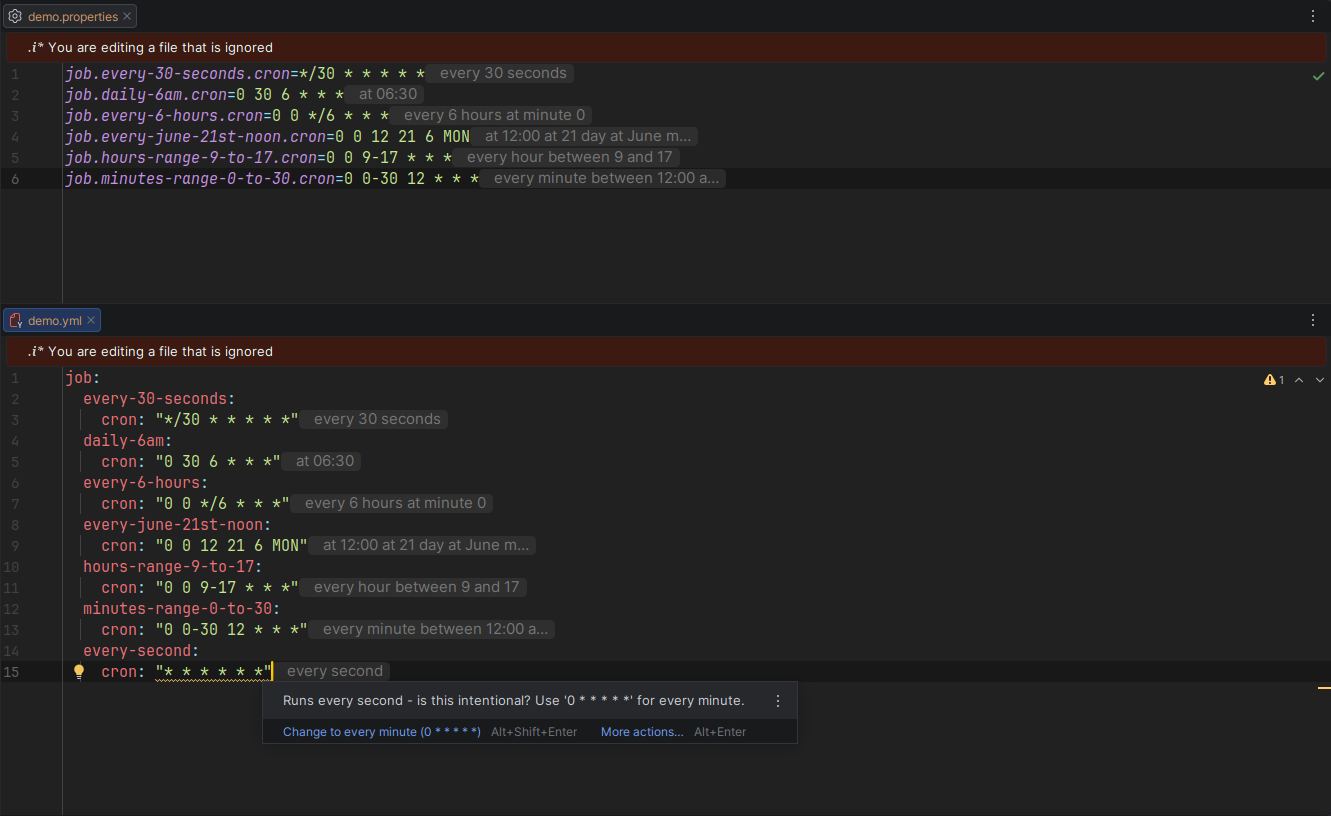
Inlay Hints Link to heading
Human-readable descriptions shown inline next to cron values — in .properties, .yaml/.yml, and @Scheduled annotations:
app.backup.cron=0 0 2 * * * # at 02:00
spring:
  job:
    cron: "0 0 9 * * MON-FRI"    # at 09:00 Monday through Friday
@Scheduled(cron = "0 30 9 * * MON-FRI")   // at 09:30 Monday through Friday
void generateReport() { ... }
Hover over the hint to see the full description when it is truncated. Toggleable under Settings → Editor → Inlay Hints.
Next Execution Times Link to heading
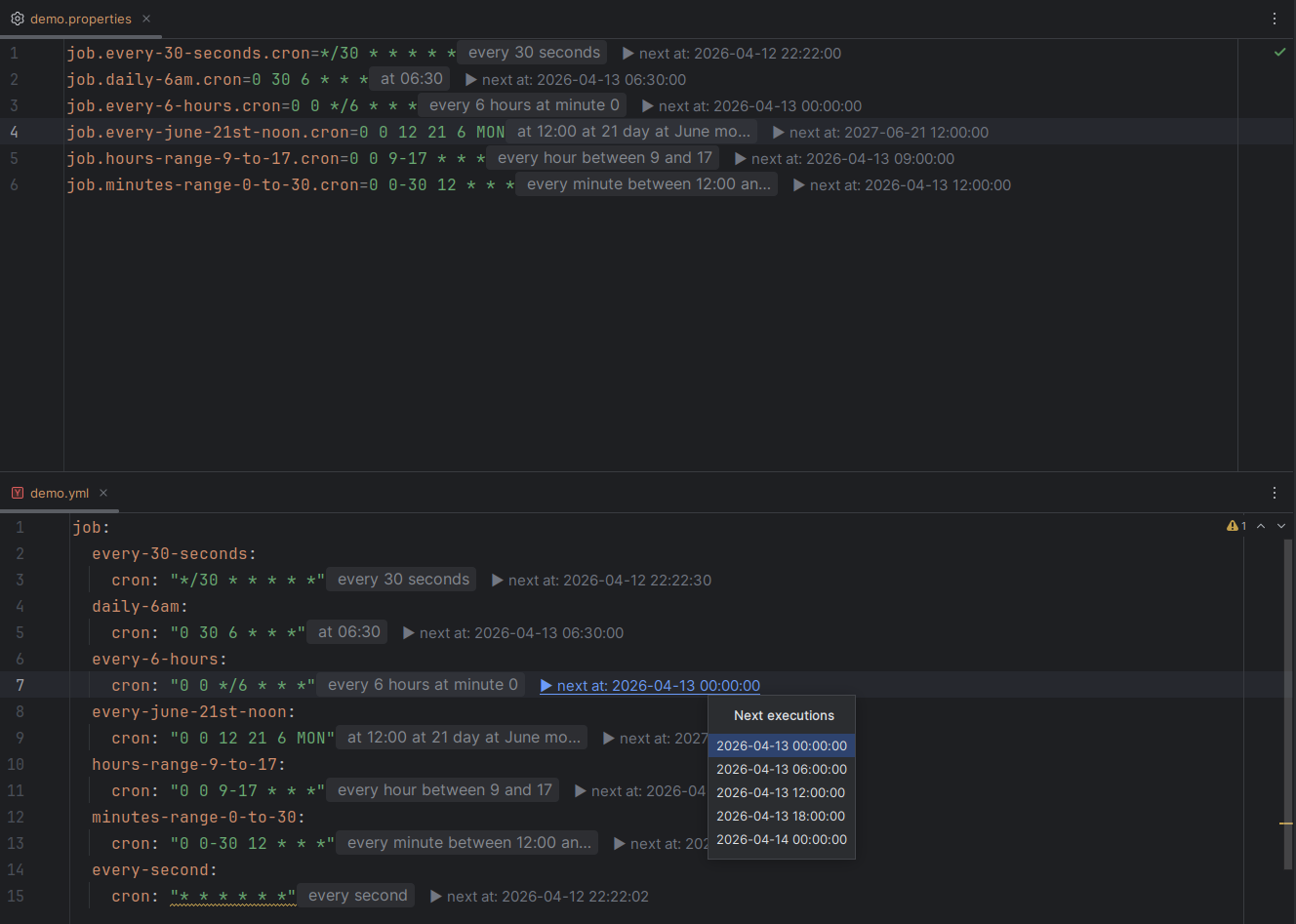
A code vision lens shows the next scheduled run inline. Click it to open a popup listing the next N upcoming executions, formatted and timezone-adjusted to your preference.
Supported in .properties, .yaml/.yml, and @Scheduled annotations. Configure the count, timezone, and date/time format under Settings → Tools → Cron Everything.
Cron Builder Link to heading
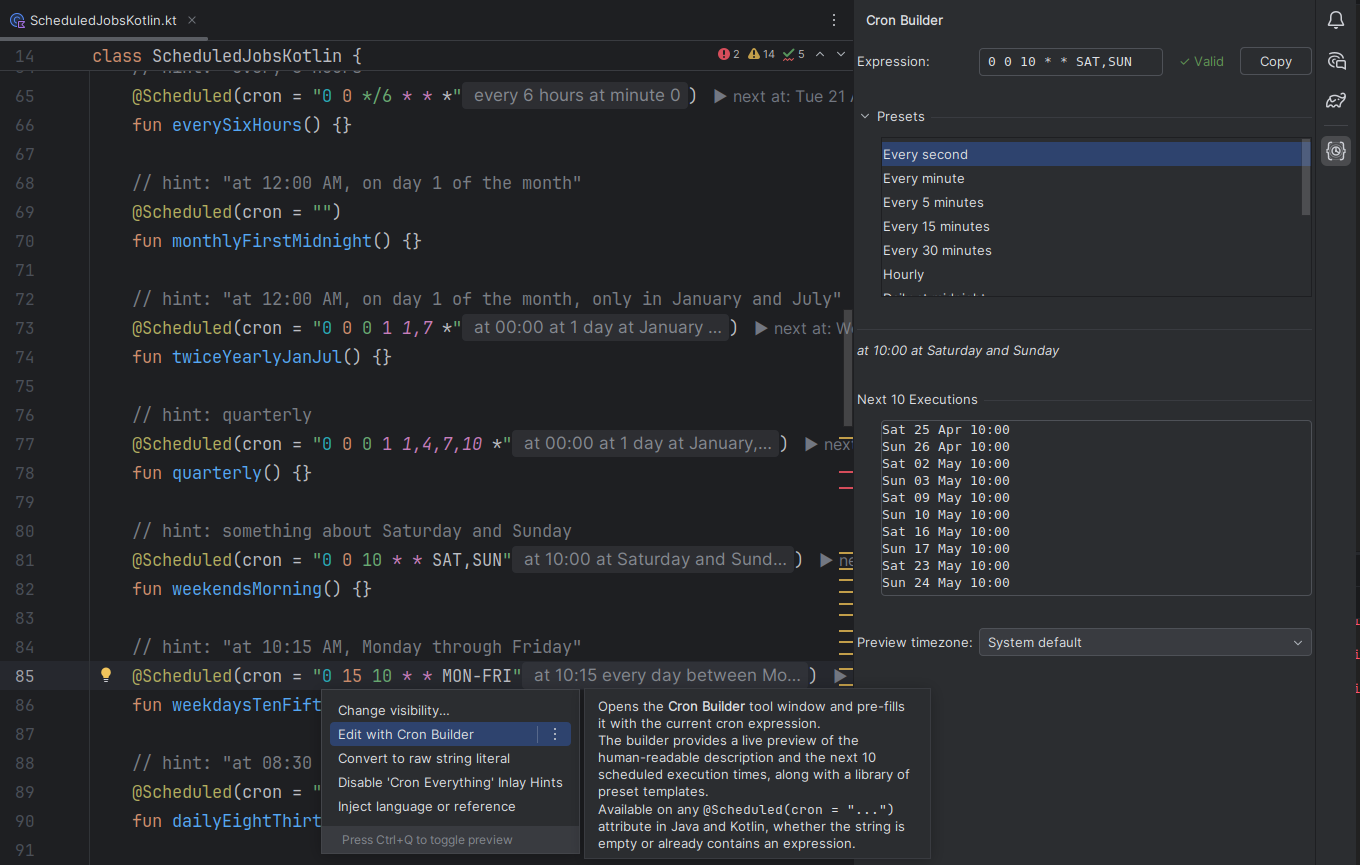
A dedicated tool window (View → Tool Windows → Cron Builder) lets you compose and validate cron expressions interactively:
- Live description and validation as you type
- Preset expression templates
- Next-10-executions preview with timezone control
- Copy-to-clipboard button
Use the Edit with Cron Builder intention action (Alt+Enter) on any @Scheduled(cron = "...") attribute to open it pre-filled with the current expression.
Syntax Highlighting Link to heading
Each field of a cron expression in @Scheduled(cron = "...") annotations receives a distinct colour: seconds, minutes, hours, day-of-month, month, and day-of-week.
Customisable via Settings → Editor → Color Scheme → Cron Expression.
Spring Property Placeholders and SpEL Link to heading
Inlay hints and code vision resolve both ${my.property} placeholders and Spring Expression Language references in @Scheduled(cron = "..."), looking up values from .properties and .yaml/.yml files.
Supported SpEL forms:
#{bean.property}- property reference on a Spring bean#{bean.getProperty()}- getter method call on a Spring bean#{@beanName.property}- explicit@-prefixed bean reference#{'${placeholder}'}- Spring placeholder wrapped in a SpEL string literal
Bean discovery covers @Component, @Service, @Repository, @Controller, @Configuration, and @ConfigurationProperties classes (including @ConstructorBinding), as well as @Bean factory methods. @ConfigurationProperties fields are resolved with relaxed binding, so kebab-case, camelCase, snake_case, and SCREAMING_SNAKE variants all match.
Inspections and Quick Fixes Link to heading
Five built-in inspections catch common mistakes before they reach production:
| Inspection | Level | Quick Fix |
|---|---|---|
| Invalid cron expression | Error | — |
Expression runs every second (* * * * * *) | Warning | Change to every minute |
Fixed minute confused with interval (5 * * * * vs */5 * * * *) | Warning | Convert to interval |
| Ambiguous numeric day-of-week (differs between Spring and Quartz) | Warning | Use named day (MON–SUN) |
| Unreachable date (e.g. Feb 30) | Warning | Use last safe day of month |
Active in all supported file types and @Scheduled annotations. Toggleable individually under Settings → Editor → Inspections → Cron Everything.
Supported Formats Link to heading
Auto-detected from field count and syntax:
| Format | Fields | Example |
|---|---|---|
| Unix | 5 fields | 30 9 * * 1-5 |
| Spring | 6 fields | 0 30 9 * * MON-FRI |
| Quartz | 6–7 fields | 0 30 9 ? * MON-FRI 2024 |
Supported Locations Link to heading
.propertiesfiles.yaml/.ymlfiles@Scheduled(cron = "...")annotations in Java and Kotlin
Settings Link to heading
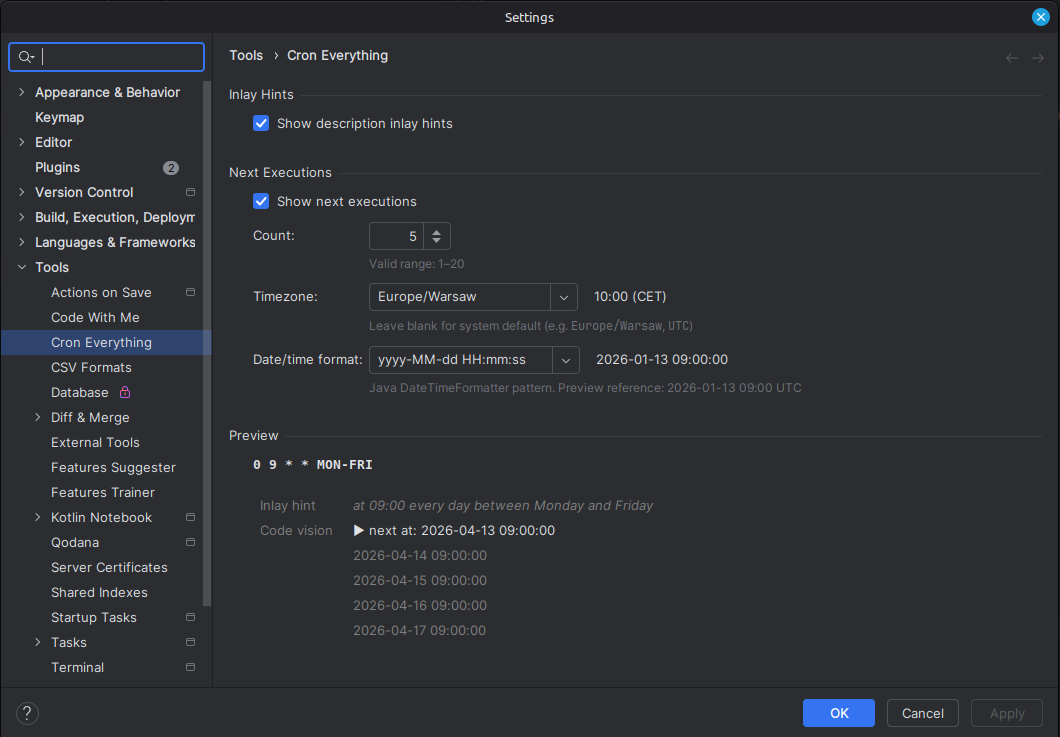
Configure via Settings → Tools → Cron Everything:
| Setting | Description |
|---|---|
| Execution count | Number of upcoming executions shown in the popup (default: 10) |
| Timezone | Timezone used when calculating and displaying execution times |
| Date/time format | Format string for execution timestamps in the popup |
| Inlay hints | Toggle human-readable descriptions shown inline in the editor |
| Next executions | Toggle the code vision lens showing the next scheduled run |
Requirements Link to heading
IntelliJ IDEA 2024.2 or later (Community or Ultimate).
Changelog Link to heading
1.1.0 — 2026-05-11 Link to heading
- SpEL expression support in @Scheduled(cron = “…”): inlay hints and code vision now resolve Spring Expression Language references
#{bean.property}- property reference on a Spring bean#{bean.getProperty()}- getter method call on a Spring bean#{@beanName.property}- explicit@-prefixed bean reference#{'${placeholder}'}- Spring placeholder wrapped in a SpEL string literal- Bean discovery for SpEL resolution covers @Component, @Service, @Repository, @Controller, @Configuration, and @ConfigurationProperties classes (including @ConstructorBinding), as well as @Bean factory methods
1.0.0 — 2026-04-20 Link to heading
- Per-field syntax highlighting in @Scheduled cron expressions (seconds, minutes, hours, day-of-month, month, day-of-week)
- Cron Builder tool window with live validation, preset templates, and next-10-executions preview
- “Edit with Cron Builder” intention action (Alt+Enter) on
@Scheduledcron attributes - Copy-to-clipboard button in the Cron Builder
- Spring property placeholders resolved in
@Scheduledfrom.propertiesand.yaml/.yml
0.3.0 — 2026-04-15 Link to heading
- Inlay hints for
@Scheduledannotations in Java and Kotlin - Code vision lens showing the next scheduled execution; click for upcoming runs popup
- Inspections for
@Scheduledcron expressions with quick fixes
0.2.1 — 2026-04-14 Link to heading
- Code vision lens showing next scheduled execution time inline; clicking opens a popup with the next N runs
- Plugin settings (Settings → Tools → Cron Everything): execution count, timezone, date/time format, toggles for inlay hints and next executions
0.1.1 — 2026-04-09 Link to heading
- Fixed: inlay hint tooltip not showing full text on Windows
0.1.0 — 2026-04-08 Link to heading
- Inlay hints in
.propertiesand.yaml/.ymlfiles showing human-readable cron descriptions - Inspections: invalid expression, runs every second, fixed minute vs interval, ambiguous day-of-week, unreachable date — each with quick fixes
- Supports Spring, Quartz, and Unix cron formats
- April 8, 2026 Cron Everything — End User License Agreement