TestBeam

TestBeam answers the question “Which tests cover this method?”
It uses two strategies: static analysis (always available, no test run required) and runtime per-test coverage (when using the IntelliJ runner with “Track per test coverage” enabled). Runtime results are more accurate and show which tests actually executed each method, not just which tests reference it.
Available on the JetBrains Marketplace · EULA
Gutter Icons Link to heading
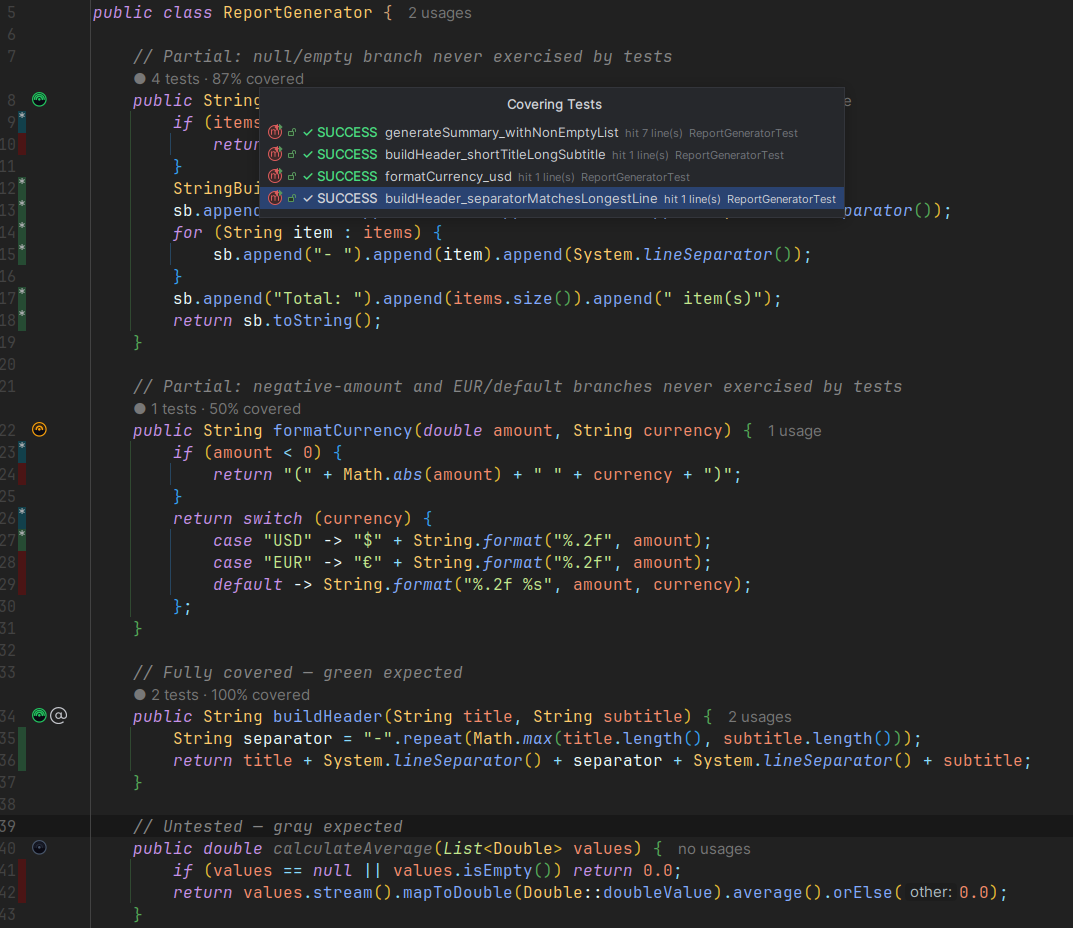
Each method gets a gutter icon showing its test coverage at a glance:
 Green - all executable lines covered
 Amber - some but not all executable lines hit
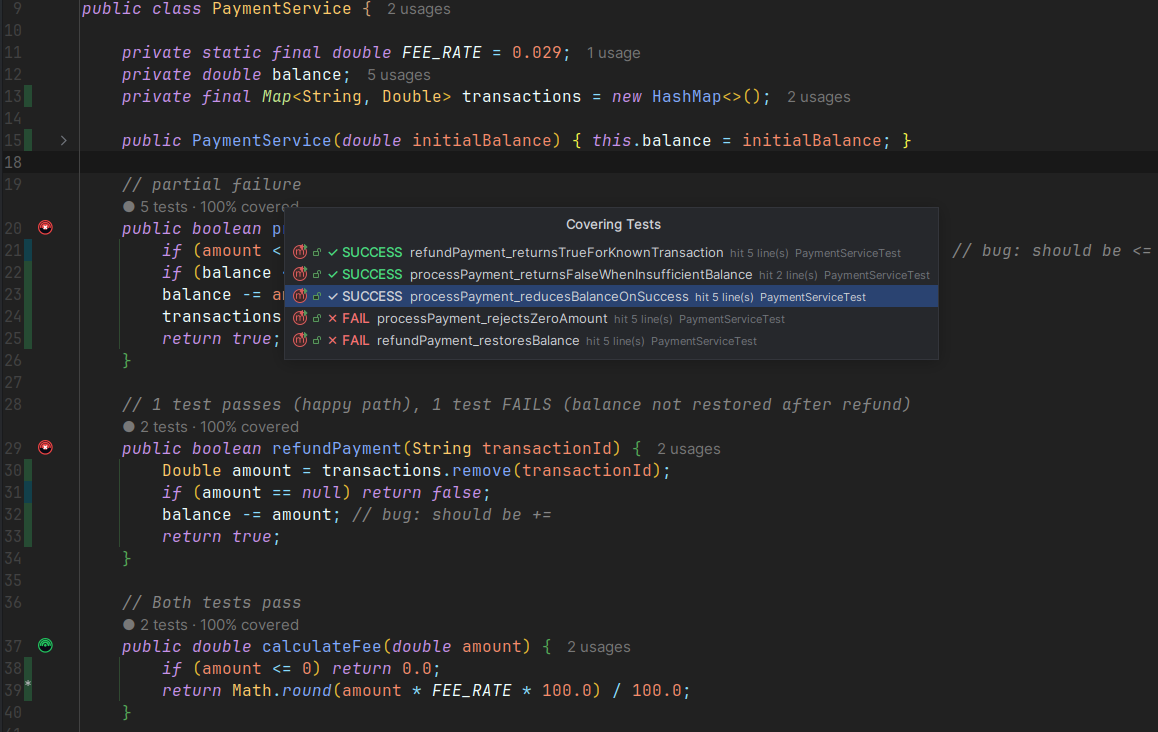
 Red - at least one covering test failed in the most recent run
 Gray - no test reference or coverage found
Click a gutter icon to open a popup listing every covering test by name, with colored badges showing whether each test was runtime-covered or statically referenced. Click any test name to navigate directly to that test method.
Gutter icon visibility can be toggled per-state under Editor → General → Gutter Icons.
Code Vision Hints Link to heading
A Code Vision hint appears above each method signature. When runtime data is available it reads “N tests · X% covered”, showing the combined line coverage percentage across all covering tests. Without runtime data it reads “N tests reference this”.
Can be toggled independently under Settings → Tools → TestBeam.
All succeeded
Partially failed
~~—
How It Works Link to heading
TestBeam combines two strategies. Static analysis performs a reference search across your test sources and finds every test method that directly calls the production method - no test run required, works with any runner.
When you use the IntelliJ runner with “Track per test coverage” enabled, TestBeam additionally reads per-test trace files to show which tests actually executed each method at runtime. Runtime coverage is preferred when available; static references are shown as a fallback or alongside runtime results based on your settings.
If you use the Gradle runner, TestBeam will offer to switch you to the IntelliJ runner to unlock runtime coverage.
Supported Test Frameworks Link to heading
| Framework | Annotations detected |
|---|---|
| JUnit 4 | @Test |
| JUnit 5 | @Test, @ParameterizedTest, @RepeatedTest, @TestFactory |
| TestNG | @Test |
Supported Languages Link to heading
Java and Kotlin source files.
Settings Link to heading
Configure TestBeam under Settings → Tools → TestBeam:
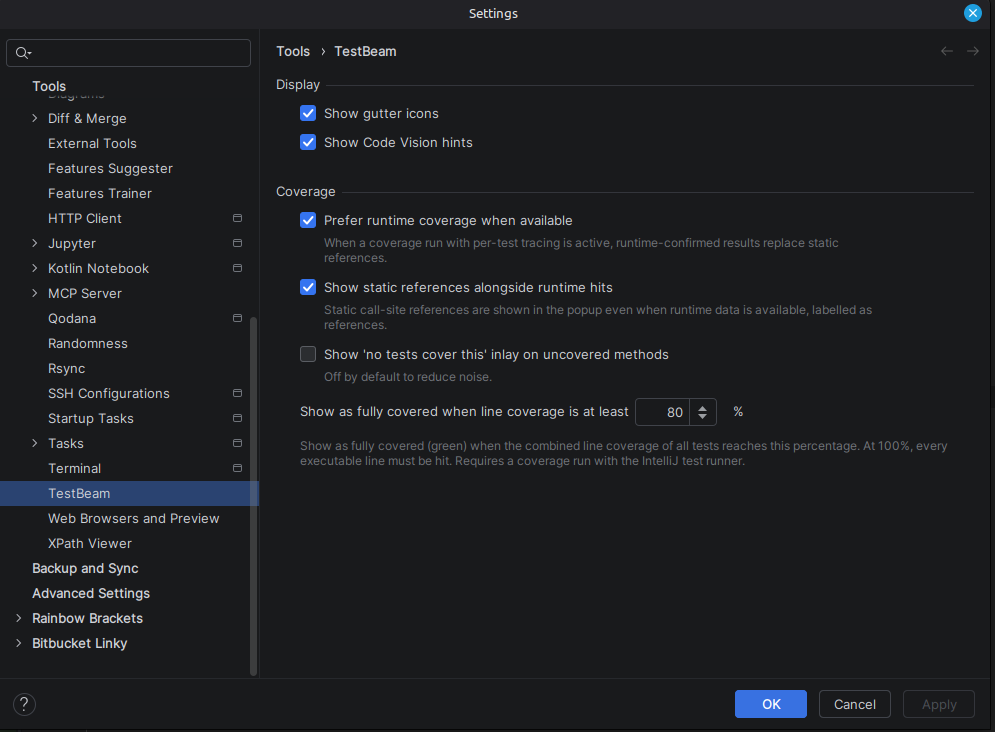
- Toggle gutter icons and Code Vision hints independently
- Prefer runtime coverage - use runtime data when available
- Show static references alongside runtime coverage - display static references even when runtime data exists
- Show ‘uncovered’ Code Vision inlay - show hints on methods with no coverage
- Coverage threshold - minimum line-coverage percentage at which a method displays as fully covered (green)
Requirements Link to heading
IntelliJ IDEA 2024.2 or later (Community or Ultimate).
Changelog Link to heading
1.1.0 - 2026-05-07 Link to heading
Runtime per-test coverage - when running tests with the IntelliJ runner and “Track per test coverage” enabled, gutter icons and Code Vision hints show which tests actually executed each method
Unified popup with colored badges differentiating runtime-covered tests from statically-referenced tests
Gradle runner onboarding banner in test files with a one-click option to switch to IntelliJ runner
Startup notification when Gradle runner is detected - prompts to switch to the IntelliJ runner with Switch / Keep / Learn More actions
Three new settings: “Prefer runtime coverage”, “Show static references alongside runtime coverage”, “Show ‘uncovered’ Code Vision inlay”
Partial coverage - amber gutter icon for methods where some but not all executable lines were hit
Coverage percentage in Code Vision - runtime hint reads “N tests · X% covered”
Failing tests - red gutter icon for methods where any covering test failed in the most recent run
Coverage threshold setting - configure the minimum line-coverage percentage at which a method displays as fully covered (green)
1.0.0 - 2026-04-21 Link to heading
Initial release.
- Gutter icons per method: green (covered) and gray (uncovered)
- Code Vision hint: “N tests reference this” above method signatures
- Click gutter icon → popup listing covering test names with one-click navigation to each test method
- Static call-graph analysis - works without running tests, fully compatible with Gradle
- JUnit 4, JUnit 5, and TestNG support (@Test, @ParameterizedTest, @RepeatedTest, @TestFactory)
- Java and Kotlin source support
- Settings panel (Settings → Tools → TestBeam) to independently toggle gutter icons and Code Vision hints
- Gutter icon visibility per-state via Editor → General → Gutter Icons
- April 21, 2026 TestBeam — End User License Agreement